How it works
From concern to consultation, in four steps.
Otheon keeps every step honest: what has been verified, what a booking status means, and what you pay.
The four steps
-
Step one
Find
Start with what you care about. Search clinics, treatments or concerns, or browse by category: face, skin, teeth, hair, body. Every clinic card shows its verification status up front, before you tap in.
-
Step two
Verify
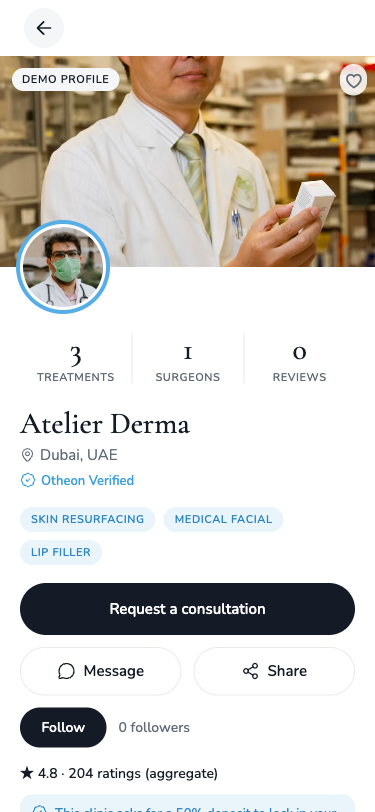
Otheon Verified means the verification team has checked the clinic's licence and the practitioners it lists. The badge sits on the profile next to the clinic's name and treatments, and it can never be bought.
What the badge means -
Step three
Book
Tap Request a consultation. The request goes to the clinic, which accepts or declines. You see the status on your profile and in My Bookings from the moment you send it.
-
Step four
Consult
Once accepted, the appointment details and a message thread with the clinic sit in one place. After your visit you can leave a review, which stays in your words.
Booking status
Requested is a request, not a promise.
Otheon never shows a booking as confirmed until the clinic has said so.
Requested
You have asked for a consultation. The clinic has been notified and will respond by accepting or declining.
Accepted
The clinic has accepted your request. The time is held for you and the details are in My Bookings.
Declined
The clinic cannot take the request. You are told straight away so you can choose another clinic or time.
Fees and cancellations
You see the fee and the policy before you request.
The consultation fee
Each clinic sets its own consultation fee, and some ask for a deposit to hold the slot. Both are shown on the profile before you request. You pay securely through Otheon, and the clinic never sees your card details. During development, payments run in test mode, so nothing is charged.
Cancellations
Each clinic sets its own cancellation policy, shown on its profile before you request. If you need to cancel or move an appointment, the clinic's policy applies, and you can message the clinic directly from the booking.
AI features · coming soon
Educational only. Never medical advice.
An assistant that explains treatments and terms in plain language, helps you compare, and points you to verified clinics. It does not diagnose, prescribe, or replace a consultation with a licensed practitioner.
What it will do
- Explain treatments and terminology without the jargon
- Show which verified clinics offer the treatment you are asking about
- Hand you straight to a consultation request when you are ready
What it will never do
- Give medical advice, a diagnosis, or a recommendation for or against a treatment
- Recommend a clinic because it paid to be recommended
Ready when you are.
Browse verified clinics for free. Request a consultation when one feels right.